

AUTHORS

Tonichi is an engineering student bound for Canada.

Angelo is a sexless being who loves to criticize.
Click HERE to know more about these adorable gremlins.
Click HERE for their contact details.
I am a proud BlogU
Student!
+/- BlogU
Students Blogroll
Blogger's Code of Conduct
Monday, April 09, 2007 | 4:37 PM
Here's something great for all of us.
After what happened to poor Kathy Sierra, friend and prominent blogger Tim O'Reilly proposed a set of blogger's COC. This is still in the process of preparation and you can view the draft HERE for suggestions or comments.
Labels: Bite-sized, Blogging and the WWW

Comments:
Back to Top

Best One So Far
Sunday, April 01, 2007 | 9:00 PM
Here's an April Fool's Prank for you, brought by the Mountain View, California-based company, Google.

It's fast. It's free. It's good for you. It's the TiSP! The Toilet Internet Service Provider.
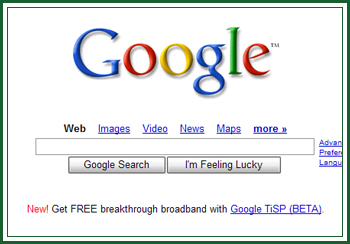
Get yours now. If you want more info, just go to the TiSP
home, or go directly to the
FAQ.
Tagged as the "Dark Porcelain" project, Google said its "Toilet Internet Service Provider" (TiSP) works with Microsoft Corp.'s new Windows Vista operating system. But sorry - septic tanks are incompatible with the system's requirements.
There are three plans available: Trickle, The #2, and the Royal Flush. Royal Flush is the fastest plan with a download rate of 32 Mbps (40X basic DSL). Wow.
There's also a mock
press release with quotes from Google Co-founder and President Larry Page such as, "What's interesting, though, is how many different modalities there are for actually getting that information to you - not to mention from you," and "There's actually a thriving little underground community that's been studying this exact solution for a long time, and today our Toilet ISP team is pleased to be leading the way through the sewers, up out of your toilet and - splat - right onto your PC."
Marissa Mayer, Google's Vice President of Search Products and User Experience, believes that "TiSP will be a breakthrough product, particularly for those users who, like Larry himself, do much of their best thinking in the bathroom."

Ready to do some GFlushing™?
Labels: Blogging and the WWW
Comments:
Back to Top
If You Wanna Rant...
Sunday, March 25, 2007 | 5:10 PM
If you have a problem with stuff and just want to write about it, better think twice and just forget about it, considering that a great majority of the blogs circulating here in the Philippines is about one thing: Ranting and having it published for the whole world to see.
However, to do something against your urge to do it, I suggest reading this blog site, which will give you a ton of laughs, and which stands out from all the other rant-blogs out there: You Want The Truth?
Author is Miss Diss, who also writes for the Man Blog. Note that she's the only female author there. On the site, she also left her email address if you "want me to diss anything on your behalf."
Go on, click it. You know you want to.
Labels: Blogging and the WWW
Comments:
Back to Top
Thanks KlipFolio
| 1:38 AM
I spent almost an hour yesterday looking for an RSS reader that suits my taste, considering functionality, user-friendliness, flexibility, and of course, aesthetics.
And this is what I found: KlipFolio!

A new (for me) personal dashboard or sidebar that allows you to monitor anything from your RSS feeds to Flickr Photos, even a live cam on the Eiffel Tower! This multitasking desktop buddy even notifies you of your CPU usage, of the date and time, even everytime your Gmail gets new email.
I am still in the early stages of reviewing this free software, and I am already impressed. I’ll give you a few of my favorites, which your eager hands would immediately experience during the first 15 minutes after downloading KlipFolio.
First is the Klips, as they call it, which are little components for each data that you want monitored (examples are Klips for the pictures on your hard drive, weekly top ten movies from IMDb, most discussed videos in YouTube). These cute little things are resizable and movable, so they don’t get in your way when you have a task. The whole dashboard is also skinnable (meaning, you can change the skins), and also allows for liquid layouts, letting you easily customize the way you view your KlipFolio.
Probably the best feature of this tool is the very convenient way with which you can manage your Klips, skins, and other KlipFolio components. At the KlipFolio website download screens, one simple click on the Add Klip button beside the Klip that you want quickly updates your KlipFolio. Downloading a new skin is even easier. At the Skins page, one click on a new skin immediately downloads it and applies it to your KlipFolio. Very hassle-free.
I’m currently trying on more Klips. With 4,000 Klips to choose from, and still increasing, I can see no end yet to my experimentations.
Here is how mine looks like so far:
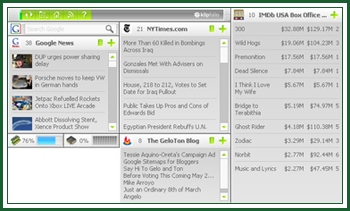
And I mentioned free, right?
Visit their
website for more info about the product.
Labels: Blogging and the WWW
Comments:
Back to Top
Google Sitemaps for Bloggers
Friday, March 23, 2007 | 9:28 AM
I’m becoming a bit frustrated about how Google treats my blog site.
To increase my chances of being indexed in Google search results, a few weeks ago, I added this blog site to Google Sitemaps. I followed the correct instructions, however, I feel like the crawl is taking so long.
However, for those of you who are still interested in having your blogspot on Sitemaps, here is the easiest route. One of the great benefits of using Sitemaps is that it allows the webmaster to directly notify Google about certain changes or additions to the site.
Login to your Google Sitemaps account using your Google account (if you have Gmail, then that should do). Once logged in, at the top of the Google Webmaster Tools window, there should be an option for you to add your site. Type in your site URL, for example, mine is http://geloton.blogspot.com, then click OK.

Before Google crawls your site for indexing, it needs to verify that you are really the owner of that web site. Click the Verify your site link.
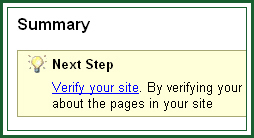
This will take you to the Verify site ownership window. Sitemaps will provide you with two options for site verification. You need to choose Add a META tag, and not the second option, Upload an HTML file, since Blogger doesn't allow that. The first options only requires you to add a piece of code to your template that Google will try to "find". Once it finds this code, your site will be verified.
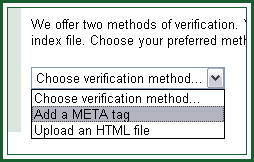
Once you've selected this option, you will receive the code that you should include in your site.
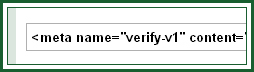
Copy this code. After which, go to your Blogger account, and go to Template. Paste the code between the HEAD tags. My ideal place is
immediately below the beginning HEAD tag. It looks like this on your template:
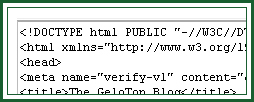
After pasting it, save your template, and go back to your Google Sitemaps account. Since you've already pasted the verification code, click the Verify button to let Google know that you own the web site.
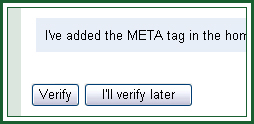
You've already verified your site. There's some debate going on about whether you should stop at verification or proceed with uploading a sitemap to Google. To read this article, go
HERE. If you wanna proceed with uploading a sitemap, then follow the next steps.
Uploading a sitemap allows you to provide Google additional information about your blog. Google will process your Sitemap and provide information on any errors and it will also download the sitemap everyday to index your blog fast.
On the Sitemaps tab, you will see a link to add a sitemap. Clicking this will take you to the Add Sitemap screen. Choose Add General Web Sitemap from the two options on the dropdown list.
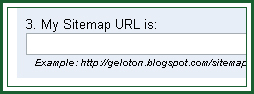
You'll see that step 3 on the list allows you to input your sitemap URL. For this, just type in you blog URL, followed by atom.xml. Yes, this is the same as your ATOM feed. For example, mine is
http://geloton.blogspot.com/atom.xml. If you are using the new Blogger, you must use http://yourblogname.blogspot.com/feeds/posts/full as the sitemap URL. Click the Add Web Sitemap button.
Now wait until you get the confirmation: You have added a Sitemap to http://yourblogname.blogspot.com/. Reports may take several hours to update. Thank you for your patience!
You're done! Now, all you have to do is to wait while Google does the job for you. I'm still waiting for mine though... :(
Labels: Blogging and the WWW
Comments:
Back to Top